In Short
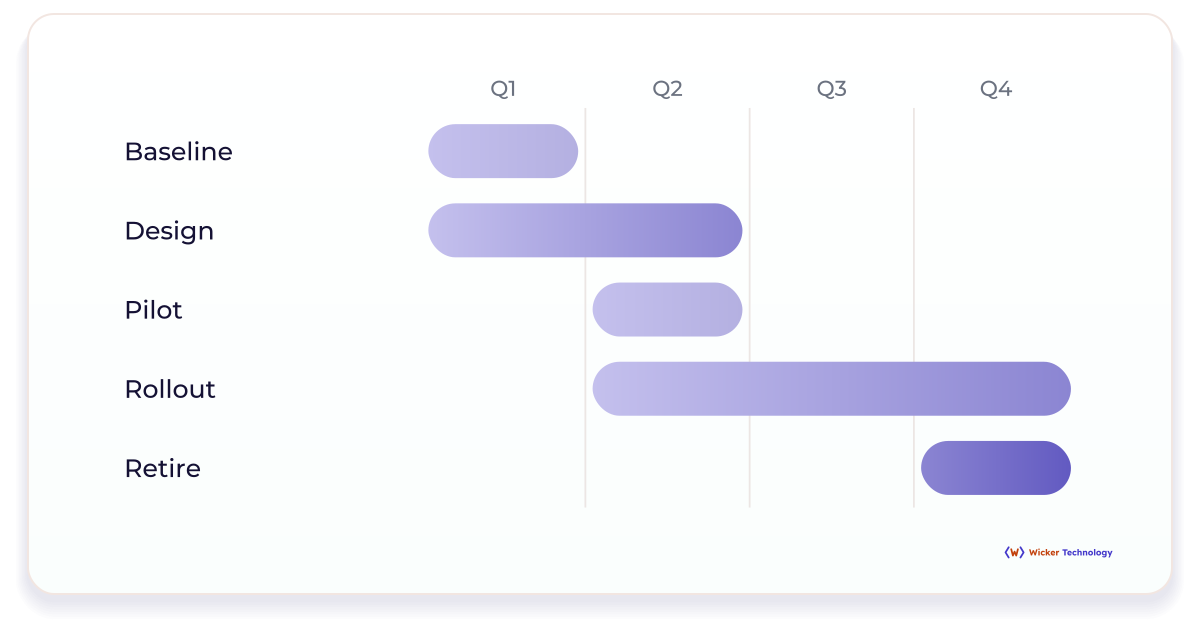
- A roadmap has five phases: baseline, design, pilot, rollout and retirement.
- Every phase ends with a gate decided by named people on named evidence.
- Run the pilot through a full business cycle so it meets the awkward cases.
- Retiring the old systems is a milestone of its own, or you pay for both stacks.
A technology transformation roadmap is a dated sequence of changes, with a result and a decision point in each. It turns a vague ambition into phases a finance lead can approve and a project team can run. If you want help building one, technology transformation consulting usually starts with exactly this document.
This guide lays out five phases, the milestones and timing I plan for in practice, and the checks that keep each phase honest. Treat the dates as ranges, since your own timeline depends on how many systems you run and how clean your data is.
The Five Phases and Their Milestones
The table is the whole roadmap on one page. Each phase ends with a gate, which is a decision made by named people on named evidence, and the next phase only starts when it passes.
| Phase | Typical timing | Main milestone | Checkpoint |
|---|---|---|---|
| 1. Baseline | Weeks 1 to 4 | Systems inventory, goals and measures agreed | Sponsor signs the goal sheet |
| 2. Design | Months 2 to 3 | Target architecture and sequenced plan | Budget and owners confirmed |
| 3. Pilot | Months 3 to 6 | One team or site live on the new setup | Measures beat the baseline |
| 4. Rollout | Months 6 to 12 | Waves of teams, sites or modules go live | Each wave meets its exit checks |
| 5. Retire and tune | Month 12 onward | Old systems switched off, savings tracked | Retirement list signed off |
Phases overlap in real life. Data cleanup for rollout waves starts during the pilot, and retirement planning starts in the design phase. The gates stop the overlap from turning into drift. Your overall direction comes from the technology transformation strategy, and the roadmap puts dates on it.
Phase 1: Baseline Your Systems and Goals
The first month produces two documents. The first is an inventory of every application, database and integration, with its owner, annual cost and the processes that depend on it. The second is a goal sheet with a business outcome, a measure and today's value for it.
Skipping this is the most common roadmap mistake I see. A team that starts building without a baseline cannot show improvement later, and a sponsor who cannot see improvement stops funding. Block four weeks and resist the pressure to start earlier. Most firms discover systems and licenses nobody remembered during the inventory.
Phase 2: Design the Target and Sequence the Work
Each system gets a verdict: keep, update, move or retire. The verdicts become a sequence, with quick wins and low-risk moves first and entangled core systems later. Dependencies set the order more than preference does, so a system that feeds five others cannot move before its feeders are ready.
This phase also fixes the budget and names an owner for every workstream. Ask for a range, not a single number, and agree who approves changes. When your options include several platforms, technology modernization consulting can help you weigh update, move and retire choices for each legacy system before you commit.
Phase 3: Run a Pilot Long Enough to Learn
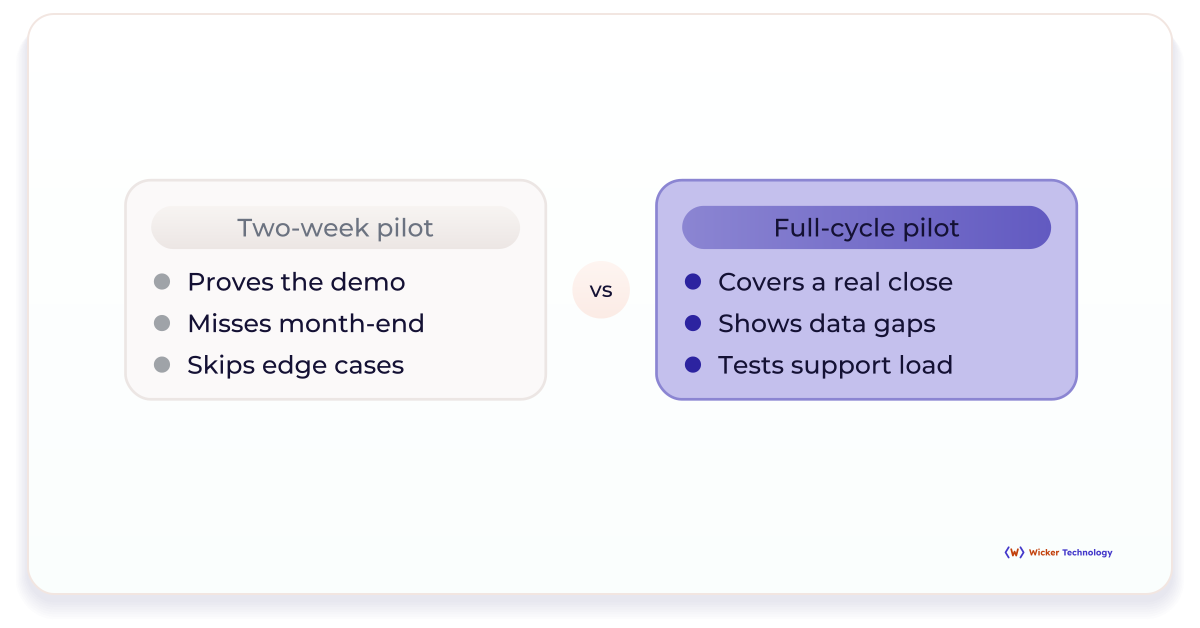
Pick one team, site or module with real volume but limited blast radius. Run it through a full business cycle, such as one month-end close, so the pilot meets the awkward cases. Measure against the baseline you set in phase one.
A pilot that only runs for two weeks mostly proves that the demo works. A pilot that runs through a close, a promotion or an audit tells you what the rollout will cost. Keep the old system read-only alongside it, so a problem costs hours and not days.
Phase 4: Roll Out in Waves
Waves let you improve the checklist as you go. The first wave is usually the slowest, and later waves speed up as the cutover steps become routine. Plan training for each wave in the weeks before it, and schedule cutovers outside your own peak periods.
Each wave has exit checks: data reconciled, users trained, support in place and rollback tested. If a wave fails its checks, it waits. Holding one wave for two weeks costs less than fixing a failed cutover. My technology transformation framework includes the exit checklist I use for this.
Phase 5: Retire What You Replaced and Tune
A transformation is not finished until the old systems are off. Retirement means archiving required data, cancelling licenses and removing integrations. Teams that skip it end up paying for both stacks, which eats the saving the program promised.
After retirement, track the measures from your goal sheet every quarter. Savings that nobody tracks fade, and the next round of work needs the evidence. The technology transformation examples show what typical results look like once this phase is done.
Who Owns Each Phase
Roadmaps fail quietly when a phase has no owner. Name one accountable person for each phase, and a sponsor above them who can break a tie. The sponsor is usually a COO, CFO or CIO, depending on where the pain sits.
In the baseline phase the owner is often an IT or operations lead, because the inventory needs access to contracts and system admins. During design, the owner should sit on the business side, since the verdicts are business decisions about what to keep. For the pilot and rollout, the owner is the leader of the team that will live with the change. That person has the most to lose from a bad cutover, and the most credibility with their own people.
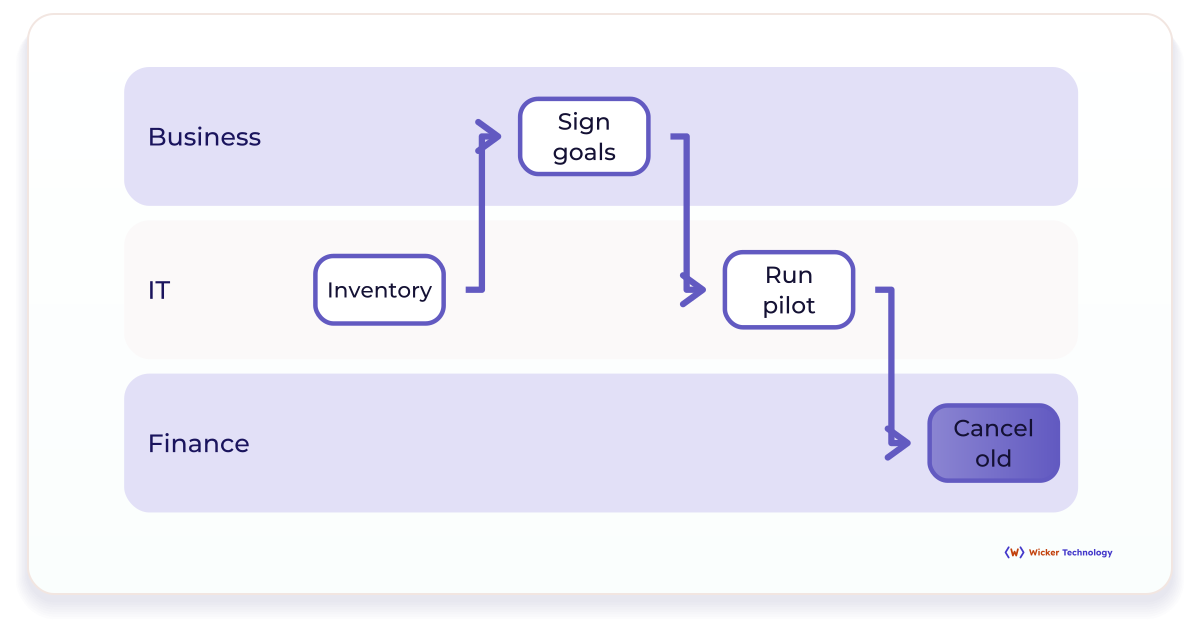
Retirement belongs with finance and IT together. Finance cancels contracts and tracks the saving, and IT archives data and switches off access. When only one of them owns it, either the license keeps renewing or the data is lost. Write the owners into the roadmap table, next to the gates, so nobody has to ask in month nine.
How Effort Shifts Across the Phases
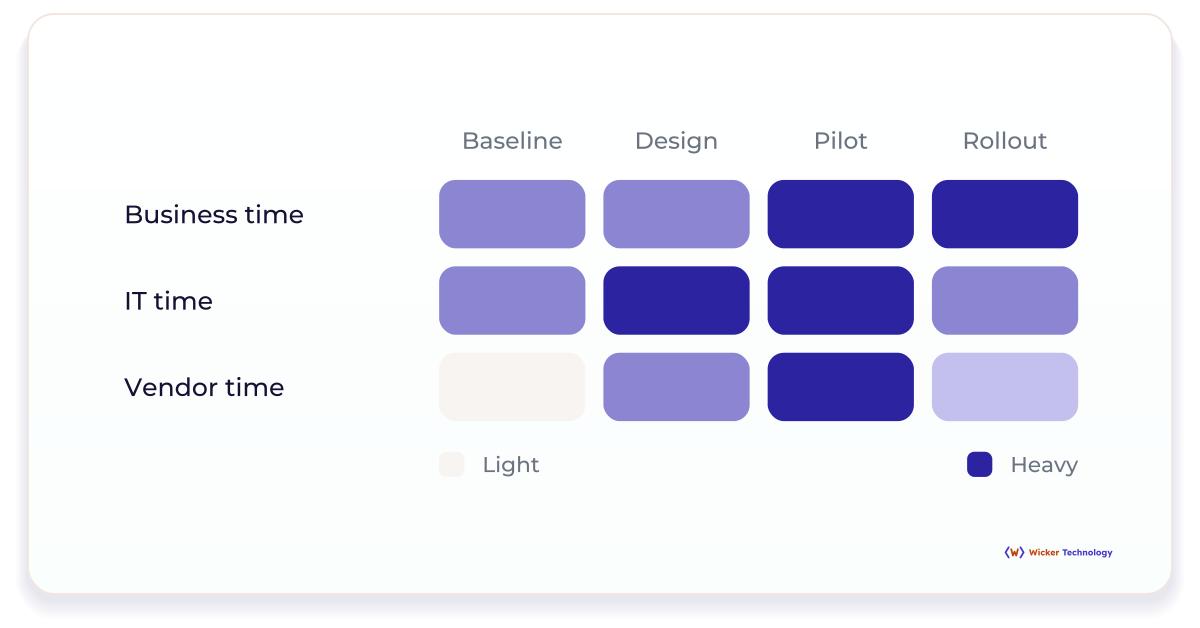
Effort is not spread evenly. The baseline phase is light on cost and heavy on calendar, because most of it is waiting for answers. Design is heavy on senior time. The pilot is the first phase where real money goes out, and rollout carries most of the cost, since every wave repeats training, migration and support.
Plan your internal time as carefully as your vendor invoices. A rollout wave can take a quarter of a department's attention for several weeks, and that capacity has to come from somewhere. Where you cannot free it, slow the waves down. A slower plan that people can absorb beats a fast plan that burns out the team and stalls in month ten.
A 12-Month Timeline You Can Copy
This sample follows a mid-sized business with a handful of core systems. Smaller firms compress it, and firms with many acquired systems stretch it. The checks in the third column are the ones I ask about in monthly reviews.
| Month | What should be true | What to check |
|---|---|---|
| 1 | Inventory finished, owners named | Does every system have an owner and a cost? |
| 3 | Plan approved, pilot scope frozen | Is the scope written and signed? |
| 4 | Data cleanup in progress | Do trial loads match source records? |
| 6 | Pilot live, first numbers in | Did the pilot beat the baseline? |
| 9 | Second wave live | Is the cutover checklist still working? |
| 12 | First systems retired | Are licenses cancelled and savings visible? |
What to Report to Your Sponsor
A one-page status keeps a roadmap alive. Report five things each month: the phase you are in, the gate date, the measure against its baseline, the budget spent against plan and the top three risks with owners. Anything longer stops being read.
Color codes help only if they mean something. I define red as a gate date at risk, amber as a risk with an owner and a plan, and green as no action needed from the sponsor. Staff stop trusting reports where everything is green until the day it is not. Say early when a date will slip, and say what you are doing about it. Sponsors forgive a slip announced in month four far more easily than one announced in month eight.
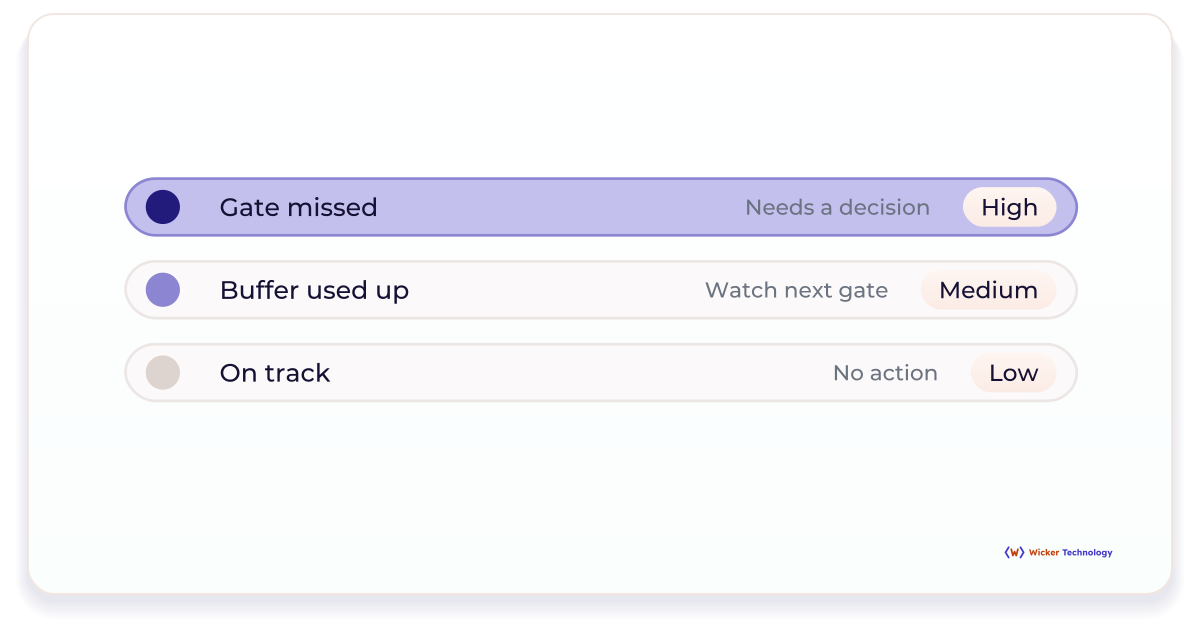
Add one line on adoption each month, such as the share of target users working in the new system. It is the earliest warning that a rollout wave is struggling, and it shows up weeks before the budget does.
What Usually Delays a Roadmap
Four causes account for most of the slips I see. Data cleanup takes longer than planned. A hidden dependency appears late. Key staff get pulled back to daily work. A vendor misses a delivery. Each has a cheap early defense: profile data in phase one, map interfaces in phase two, protect named people's time in writing and add buffer to vendor dates.
Put a buffer in each phase, not one big buffer at the end. A phase buffer is visible and gets used on purpose, while an end buffer is spent by the time you need it. Many firms add a month to phase four for every acquired business that brings its own systems.
How to Adapt This Roadmap to Your Business
Start from the five phases and adjust the length, not the order. Check your version against these points before you share it:
- Every phase ends with a gate, an owner and a decision.
- The pilot runs through at least one full business cycle.
- Cutovers avoid your busiest weeks.
- Retirement of old systems has its own dated milestone.
- Each phase has its own buffer and its own budget line.
If the plan feels thin, the likely cause is a skipped baseline. Go back to phase one, and look at the technology transformation challenges that most often appear at each gate.
Questions About Technology Transformation Roadmaps
What Is a Technology Transformation Roadmap?
It is a dated sequence of changes to your systems and processes, with a result and a decision gate in each phase. It turns a strategy into something a finance lead can approve and a project team can run.
How Long Should a Transformation Roadmap Cover?
Twelve to eighteen months is a practical range for a mid-sized business. Longer plans tend to go stale, so plan detail for the next two phases and keep later phases at a higher level.
What Is the Difference Between a Roadmap and a Strategy?
A strategy sets direction and priorities. A roadmap sequences the work, with dates, owners and gates. You need the strategy first, or the roadmap will sequence the wrong things.
What Should Be in Each Milestone?
A named deliverable, an owner, a measure and a date. Add the evidence the gate reviewers will look at, so the decision is not a matter of opinion.
How Do I Handle Delays in the Roadmap?
Give each phase its own buffer, review progress monthly and decide in advance what moves when time runs short. Cutting scope is usually safer than cutting testing or training.
When Should Old Systems Be Retired?
Once the new system has run a full business cycle without a fallback to the old one. Put retirement on the roadmap with a date and an owner, and cancel licenses at the next renewal.
Do I Need a Consultant to Build a Roadmap?
Not always. If you have mapped your systems and agreed your goals, an internal team can draft one. Outside help is most useful for dependency mapping and for an independent view of the sequence and the budget.
Important: nothing in this article is legal, financial or tax advice. All figures are estimates from typical projects, so verify them with your own providers and advisers.
Was this useful?
We appreciate the feedback.
Paige Mulvaney
Paige leads the Wicker editorial team and works with the consultants who run the roadmaps, software selections, implementations and integrations to turn real client projects into practical guides. Her focus is plain-language advice on IT strategy, choosing business software and connecting systems so they work together. Every article she edits is checked against current vendor pricing and documentation before it is published.