In Short
- The strongest integrations remove retyping between systems that already hold the right data.
- Agree which system owns each record before building, because conflicts cause most sync errors.
- Start with a read-only or single-line pilot, then extend once the numbers match.
- Measure a baseline first, so you can prove time saved and errors avoided.
Integration projects are easy to describe and hard to picture. Everyone agrees that systems should share data, but few people have seen what the result looks like in a clinic, a warehouse or a finance team. If you are weighing a project, my team's technology integration consulting work is where these examples come from.
Below are 12 examples across departments. Each one shows the problem, what changed, a short step list and the tools that usually fit. Treat the results as typical ranges from my client work, not promises, and check them against your own volumes.
What Counts as an Integration, and What Does Not
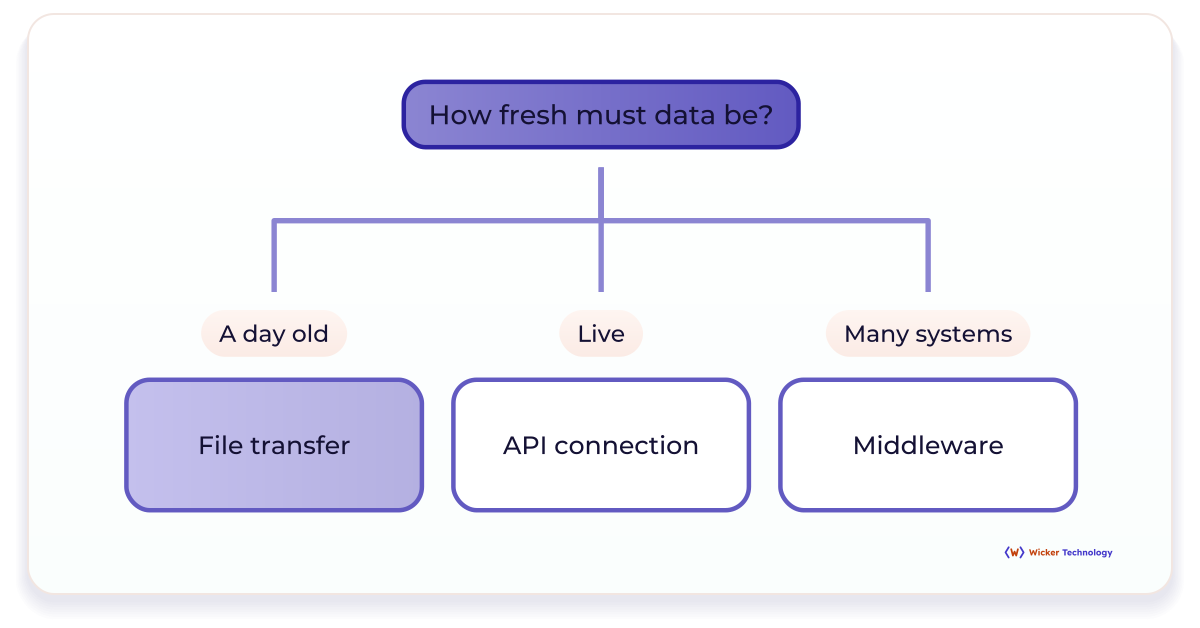
Before the list, a short definition helps, because the word covers very different work. Some connections move data once a day, some in seconds, and some only let you look at data held elsewhere.
| Type | How it works | Best for |
|---|---|---|
| File transfer | A system exports a file and another imports it on a schedule | Low volume and data that can be a day old |
| API connection | Systems exchange records directly through published interfaces | Live updates such as orders and stock |
| Middleware or platform | A central layer translates between many systems and records failures | Several systems and growing needs |
| Read-only view | One system shows data from another without copying it | Support and reporting where changes are not needed |
Most of the strongest examples mix these types. For standards that keep them reliable, see my list of technology integration best practices.
12 Technology Integration Examples by Department
Each example below follows the same pattern: what was broken, what changed and what to watch for. If you want the common pitfalls behind them, my notes on technology integration challenges go deeper.
Scheduling to Billing in a Clinic Group
A regional clinic group kept appointments in one system and charges in another. Front desk staff retyped each visit at the end of the day, and about one claim in ten went out with a wrong code or date. After the two systems were connected, a completed visit created the charge on its own. In my client work, billing errors in this kind of setup fall by roughly a third in the first quarter.
The hard part was not the connection. It was agreeing which system owns the visit type list. Until that rule was written down, every sync produced a few mismatches that someone had to fix by hand. Once the scheduling system became the single source, the exceptions nearly vanished.
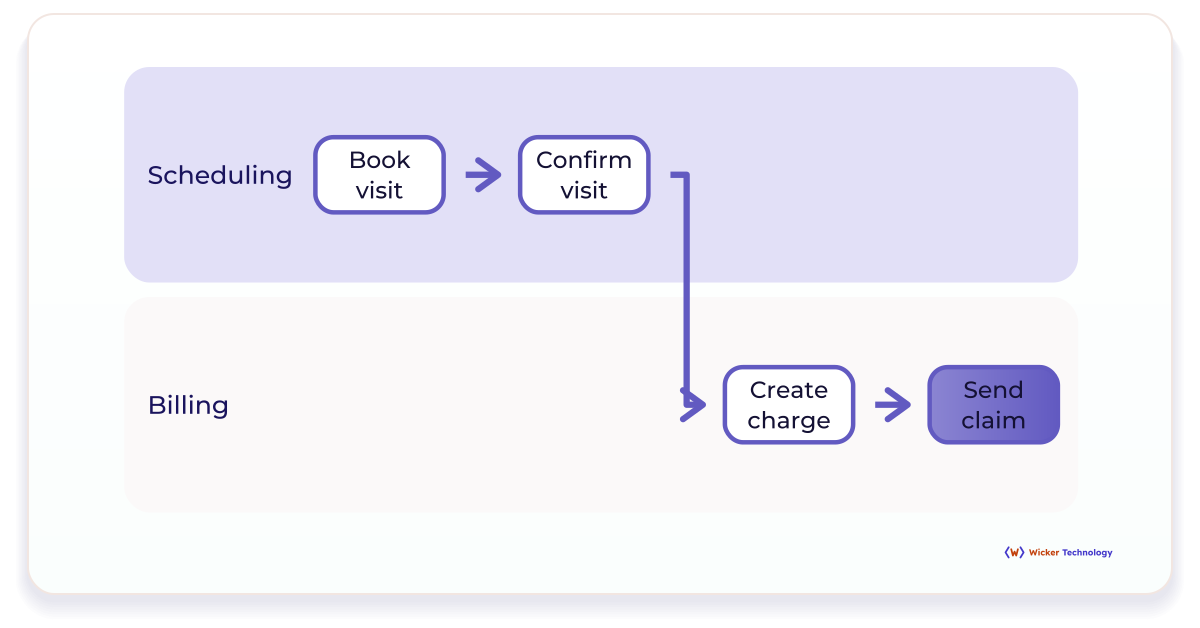
How the data moves
- Pick one system as the owner of visit types and provider codes.
- Map each appointment field to its billing field.
- Send completed visits to billing as draft charges.
- Route rejected claims back to the front desk with the reason.
- Reconcile the day's visits against charges every evening.
Tools used
A healthcare-grade integration engine or the vendors' own APIs usually does the job. Choose whichever your two vendors both support well, and check how each handles failed messages before you sign.
Orders Flowing From ERP to Carrier Portals
A freight forwarder typed every shipment into the ERP, then again into three carrier portals. Rates and tracking numbers lived in emails. Connecting the ERP to the carriers' APIs let one entry produce the booking, the label and the tracking link. Order entry time dropped sharply, and customers could see status without calling.
I would warn you about carrier APIs: they differ in field names, limits and uptime. Plan for a translation layer instead of building one connection per carrier. When the fourth carrier joins, you add a mapping, not a project.
What the integration does
- List the data each carrier needs for a booking.
- Build one internal shipment format.
- Translate that format to each carrier's API.
- Store tracking numbers back on the ERP order.
- Alert dispatch when a booking is rejected.
Tools used
Middleware with a carrier connector library saves months. If you ship through few carriers, direct API calls from your ERP may be enough.
CRM Deals Creating Invoices
Sales closed a deal in the CRM, then emailed finance, who rebuilt the order in the billing system. Invoices went out days late and prices sometimes differed from the quote. Linking the CRM to billing made a closed deal create a draft invoice with the agreed price and terms.
Edge case: discounts. Sales often negotiates something that billing has no field for. Decide before the build whether the discount lives on the line item or in a separate credit, or you will spend week six arguing about it.
From sale to invoice
- Define which deal stages trigger an invoice.
- Map products and prices between both systems.
- Create the invoice as a draft for finance to approve.
- Write the invoice number back to the CRM deal.
- Flag deals with terms the billing system cannot hold.
Tools used
Most CRM and billing vendors offer a ready connector. Use it for standard cases and add a small custom step only for the exceptions.
Store Stock Visible Online
A specialty retailer sold online from stock that the stores also sold. Counts were updated once a night, so popular items sold twice and customers got cancellations. Connecting store point-of-sale to the web shop made stock changes flow within minutes.
The surprise was how bad the product data was. Three item codes pointed to one product. The integration forced a clean-up that the business had put off for years, and that clean-up was worth as much as the sync.
How a booking gets made
- Match product codes across the point-of-sale and the shop.
- Merge duplicate items before connecting anything.
- Send stock changes as events, not nightly files.
- Hold back a small safety buffer on fast sellers.
- Show the same stock number to staff and customers.
Tools used
Many point-of-sale vendors publish stock APIs. Event-based sync beats scheduled files whenever your sales volume is high.
New Hire Data Reaching Every System
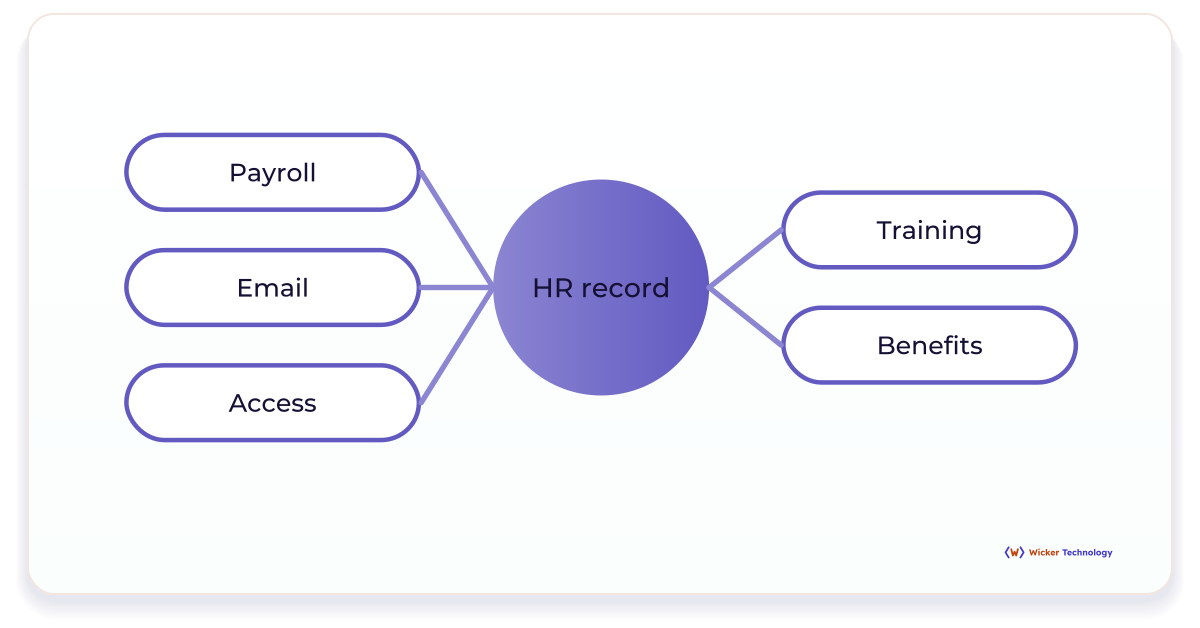
Each new employee meant entering name, role and start date in the HR system, payroll, the email directory and the badge system. Mistakes caused late first paychecks and missing access on day one. One approved record in the HR system now creates the rest.
Make the HR record the owner and lock the other systems against edits to those fields. Otherwise someone fixes a typo in payroll, and the next sync overwrites it.
How stock stays accurate
- Define which HR fields feed which system.
- Create accounts automatically on the approved start date.
- Send role changes to access groups.
- Disable access on the termination date.
- Report any failed account creation to HR the same day.
Tools used
An identity platform often handles the directory and access parts. Payroll usually needs its own connector, so check what your vendor supports.
Shop Floor Data Into the ERP
A small manufacturer recorded production on paper and keyed it into the ERP the next day. Costs were always a day behind and stock was unreliable. Connecting machine counters and a simple tablet screen to the ERP gave live production and material use.
Begin with one line, not the whole plant. The first line teaches you about network gaps, naming and operator habits. The other lines then go quicker.
From hire to access
- Choose one production line as the pilot.
- Capture counts and scrap on a tablet or machine signal.
- Send them to the ERP as production transactions.
- Compare ERP stock with a physical count weekly.
- Extend to the next line when the numbers match.
Tools used
Industrial gateways and the ERP's own shop floor module are the typical pair. Keep operators involved in the screen design.
Helpdesk Seeing Orders and Billing
Support agents switched between three systems to answer one question about an order. Customers waited while the agent searched. Pulling order and invoice data into the helpdesk ticket cut handling time and the number of transfers.
This integration is read-only, which makes it the safest one on this list. If you are nervous about connecting systems, start here. Agents see data without being able to break it.
From machine to ERP
- List the questions agents ask most often.
- Show the matching order and invoice on the ticket.
- Link back to the source record for details.
- Log which data agents use so you can trim the rest.
- Add write actions only after the read view works.
Tools used
Helpdesk platforms have apps and APIs for most ERPs and shops. A lightweight custom panel is often cheaper than a full platform.
Procurement Matching Purchase Orders
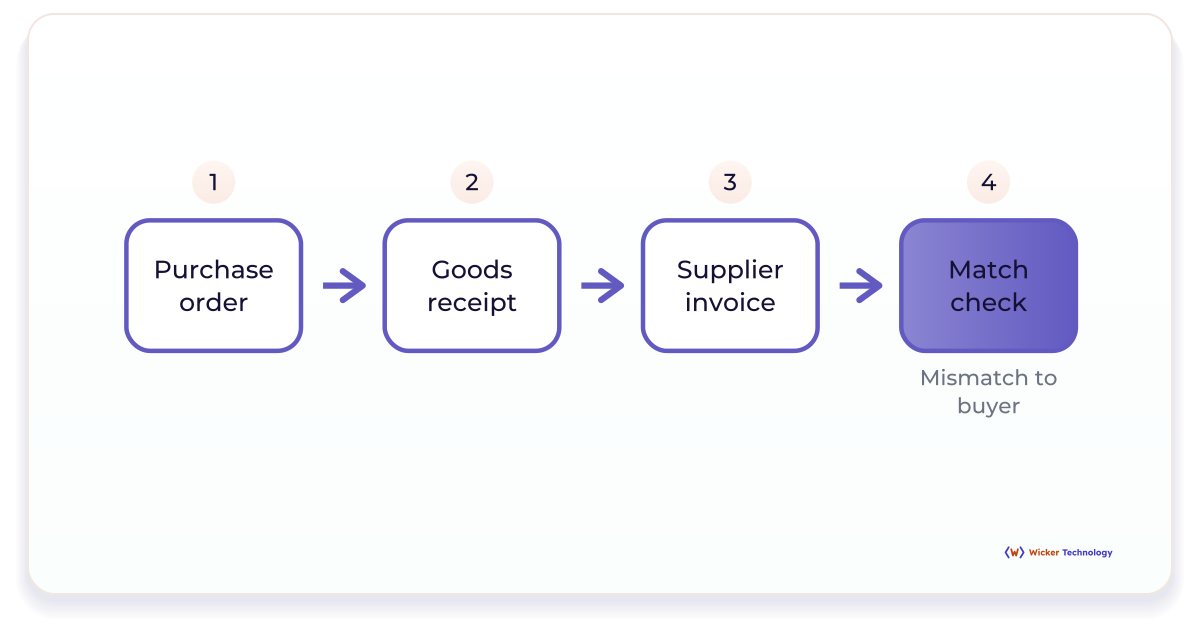
Purchase orders lived in one tool, goods receipts in a warehouse system and invoices in finance. Matching the three took days at month-end. A three-way connection let the system match automatically and show only exceptions.
The exceptions matter. A match rate of 90 percent sounds good until you see that the remaining 10 percent are your highest-value orders. Review the rules for tolerance carefully.
What agents see
- Define the match tolerance for price and quantity.
- Send receipts and invoices to the matching engine.
- Auto-approve clean matches.
- Send exceptions to the buyer with the difference shown.
- Review the tolerance rules every quarter.
Tools used
Many ERPs include matching. A connected spend-management tool helps when your purchase orders live outside the ERP.
Bank Feeds Into Accounting
Bookkeepers downloaded bank files, cleaned them in a spreadsheet and imported them. It took hours and invited errors. A direct bank feed with rules for common transactions made daily reconciliation a short review.
Rules need maintenance. Suppliers change names and a rule that worked last year now miscodes. Put a monthly look at the rule list on the calendar.
How matching works
- Connect each bank account through the provider's feed.
- Write rules for the twenty most common transactions.
- Review unmatched items daily.
- Lock reconciled periods.
- Audit the rules every month.
Tools used
Your accounting platform's bank feed is the first choice. Aggregators are worth a look when you hold accounts in several banks.
Marketing and CRM Sharing Leads
Marketing collected leads in one tool and sales worked in another. Leads arrived as spreadsheets and sat for days. Connecting the two sent each lead to the CRM with its source and score within minutes.
Agree on lead status names with sales first. Many integrations fail because the two teams use the same word for different things.
From bank to ledger
- Agree on status names and lead scoring.
- Map form fields to CRM fields.
- Create or update the CRM contact in minutes.
- Return deal outcomes to marketing.
- Check duplicates weekly.
Tools used
Native connectors cover most pairs. Use middleware when you need rules, such as routing by region.
Monitoring Linked to Ticketing
Alerts arrived by email and nobody knew who had seen them. Linking monitoring to the ticket system turned each alert into a ticket with an owner and a due time.
Alert noise is the risk. Connect only the alerts that someone is expected to act on, or you will train people to ignore the queue.
From contract to reminder
- Choose which alerts deserve a ticket.
- Create a ticket with the affected system.
- Assign by schedule.
- Close the ticket when the alert clears.
- Review noisy alerts each month.
Tools used
Most monitoring tools integrate with common ticket systems out of the box. Tune the rules before turning on automatic assignment.
How to Choose Which Integration to Build First
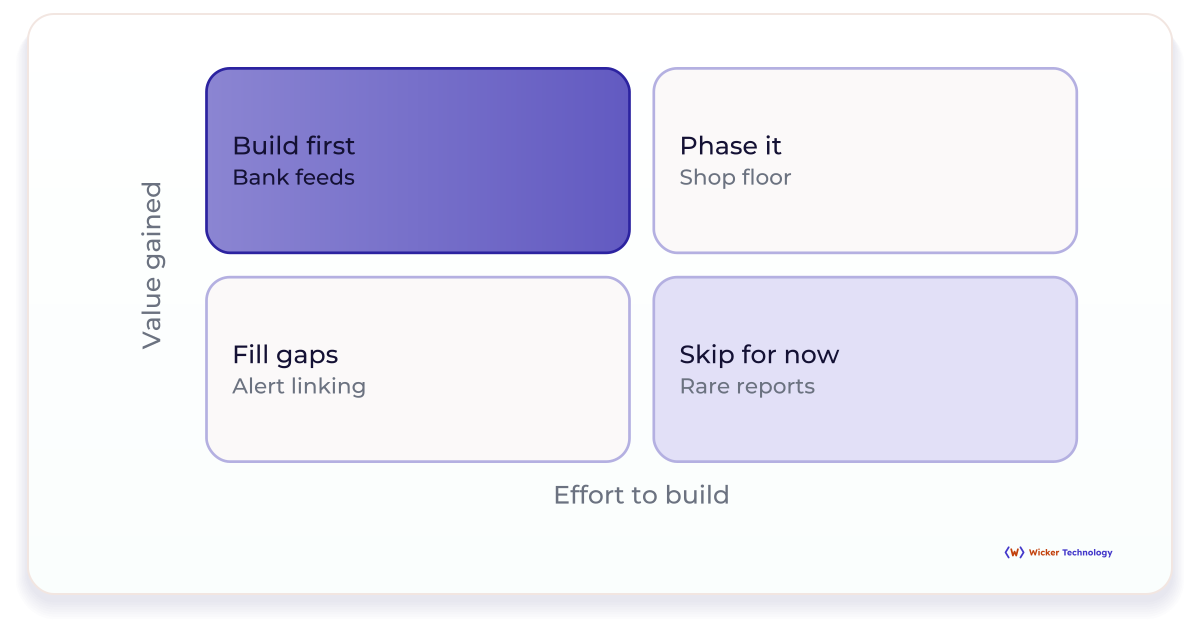
Most companies have a dozen candidates. I use four checks to pick the first one, and they usually point to the same answer.
- The hand-off happens many times a week.
- Errors are costly, so accuracy has a clear value.
- Both systems already hold the data and offer an API or a file export.
- One person can own the connection and its alerts.
Score your list against these, then take the top two. A simple data flow map helps here, and my technology integration framework shows how to draw it. The wider plan belongs in a technology integration strategy.
Questions About Technology Integration Examples
What Is the Most Common Technology Integration Example?
Connecting a CRM or order system to billing is the one I see most. The hand-off is frequent, easy to measure and prone to retyping errors, which makes it a good first project for most businesses.
How Long Does a Typical Integration Take?
A single connection between two well-documented systems often takes four to eight weeks, including testing with your real data. Older systems, poor data and unclear ownership add time, so treat the range as a starting point.
Do I Need a Middleware Platform?
Not for two or three systems with good APIs. Once you connect many systems, a central layer gives you one place to translate data and watch for failures. Your assessment should show which side of that line you are on.
What Does an Integration Cost?
The price depends on the number of systems, the quality of their APIs and your data. Licence costs for connectors are often smaller than the staff time for mapping and testing. Ask for a fixed quote after an assessment.
How Do I Measure Whether an Integration Worked?
Record a baseline before the build: time spent on the hand-off, error rate and delay. After go-live, compare those numbers monthly. If you cannot measure the hand-off today, the first step is to measure it.
What If One of My Systems Has No API?
File exports, database access or screen-level tools can bridge the gap, although they are more fragile. Sometimes replacing the system costs less than connecting it, and a good consultant will tell you so.
Who Should Own an Integration After It Goes Live?
One named person in the business, with IT as backup. The owner receives the alerts, decides on changes and checks the health report. Connections with no owner tend to fail quietly.
Important: nothing in this article is legal, financial or tax advice. All figures are estimates from typical projects, so verify them with your own providers and advisers.
Was this useful?
We appreciate the feedback.
Paige Mulvaney
Paige leads the Wicker editorial team and works with the consultants who run the roadmaps, software selections, implementations and integrations to turn real client projects into practical guides. Her focus is plain-language advice on IT strategy, choosing business software and connecting systems so they work together. Every article she edits is checked against current vendor pricing and documentation before it is published.