In Short
- Start with the daily money flow: intake, drafting, time capture and online payments.
- Technology removes repeated steps while a lawyer keeps responsibility for every legal judgment.
- Most stalled projects lack an owner, a baseline number and repeated training.
- Check confidentiality, trust accounting and AI rules with your own advisers before you start.
Law firms and legal departments run on a small set of repeating tasks: intake, drafting, time recording, billing, review and storage. Technology pays off where it removes a repeated step without changing who is responsible for the legal judgment. If you plan to work through several of these at once, legal technology consulting can help you sequence them.
Below are nine tactics I see work in firms and in-house teams, with the steps that make each one stick. Results vary with firm size, practice area and the system you start from, so treat the outcomes as directions to test, not promises. If you would like the product side first, my ranking of legal software compares the main platforms.
The Nine Tactics at a Glance
| Tactic | Area | What changes |
|---|---|---|
| 1. Client Intake and Conflict Checks | Intake and operations | Fewer matters opened with missing data |
| 2. Document Automation for Standard Agreements | Drafting | Faster, more consistent first drafts |
| 3. Time Capture From Email and Calendar | Billing | More time recorded on the day it is worked |
| 4. Online Payments and Trust-Compliant Billing | Billing | Faster payment and simpler reconciliation |
| 5. E-Signature and a Client Portal | Client service | Clients sign and pay from one place |
| 6. Contract Review and Clause Extraction for In-House Teams | In-house | Reviewers see exceptions, not every line |
| 7. Technology-Assisted Review for Large Document Sets | Litigation | Reviewers focus on likely relevant documents |
| 8. Matter-Based Security and Document Workspaces | Security | Access follows the matter and ethical walls hold |
| 9. AI Drafting and Research Assistants With Human Review | Drafting and research | Summaries and outlines in minutes, checked by a lawyer |
Nine Legal Technology Tactics That Delivered
The first four cover the daily money flow of a firm: getting matters opened properly, drafting faster, recording time and getting paid. They are also the ones that tend to pay back fastest, so a roadmap often starts there. For the sequencing, see my legal technology roadmap.
Client Intake and Conflict Checks
A web form or phone script captures the same facts every time: who the prospect is, who the other parties are, what the matter covers. The data flows into your matter system as a prospect record, and a conflict search runs against existing clients and adverse parties before anyone books a call. Firms that adopt this usually stop losing leads to slow replies, because the first response goes out the same day.
The tactic works because it moves checking to the front of the process. Where the conflict result is clear, a partner approves in minutes. Where it is not, the prospect waits a few hours instead of a week. In my client work, the biggest change is not speed but fewer matters opened with missing information, which removes a steady stream of cleanup later.
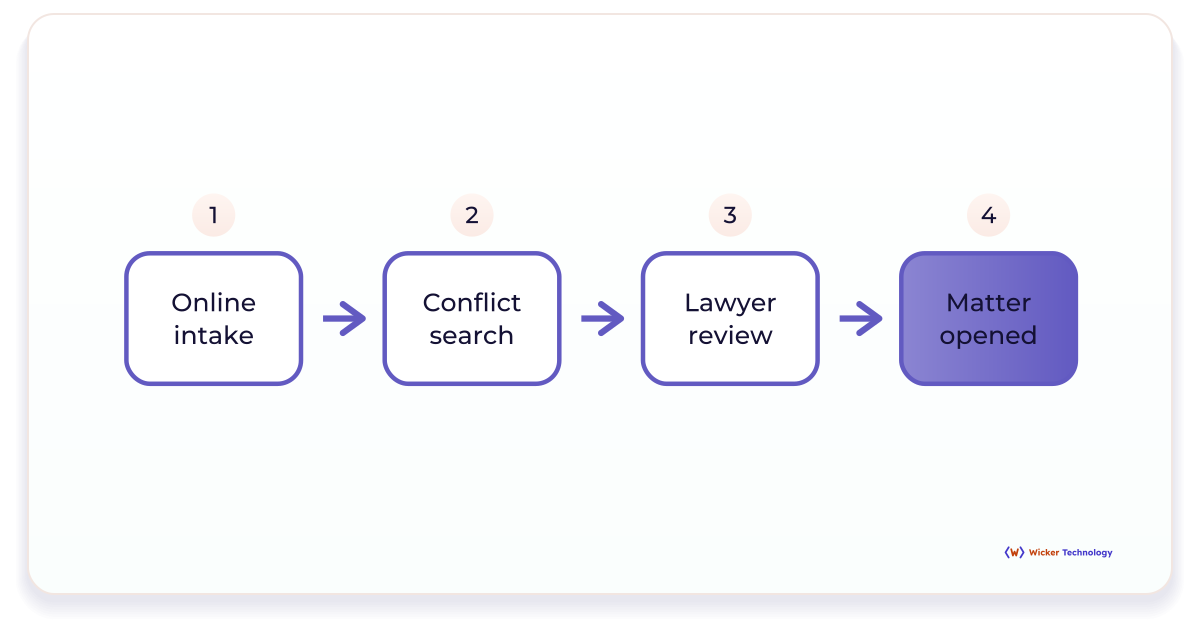
How the intake flow runs
- Prospects submit a form or are entered by the front desk during the first call.
- The system searches names and related parties against clients and past matters.
- A reviewer sees possible matches with the reason each one was flagged.
- The responsible lawyer approves or declines with a note kept on the record.
- Accepted prospects convert to a matter with the details already filled in.
- Engagement letters go out for e-signature in the same step.
What this takes
Most practice management platforms include intake forms and conflict search, and dedicated intake tools add scheduling and follow-up. Your main work is agreeing which parties must be captured on every intake.
Document Automation for Standard Agreements
Instead of copying last year's agreement and editing names, the lawyer answers a short questionnaire and the system generates the document with the right clauses. Engagement letters, NDAs, leases, wills and routine commercial agreements are the usual starting points, because they repeat and the variations are known.
The saving shows up at review time, not only at drafting time. A document built from approved clauses has fewer surprises, so the reviewer reads for substance. The failure mode is template sprawl: forty versions of an NDA, each owned by a different lawyer. Decide who owns each template before you build it.
Steps to build your first template
- Pick one document type your firm produces at least twice a week.
- Collect the last ten versions and mark which clauses change and which never do.
- Have a senior lawyer approve the fixed language and the allowed alternatives.
- Turn the changing parts into questions in the template tool.
- Test with two real matters before anyone else uses it.
- Name an owner who reviews the template twice a year.
What this takes
Document assembly features exist in several practice platforms and in dedicated tools. Start with the platform you own, because the data in your matters can fill the document with no extra typing.
Time Capture From Email and Calendar
Lawyers lose billable time because they record it late. Tools that suggest time entries from sent email, calendar events and document activity give them a draft at the end of the day, so the task becomes reviewing instead of remembering. Firms that adopt it often find that a meaningful share of previously unrecorded time shows up.
The tactic fails when lawyers distrust the suggestions or when privacy settings are loose. Start with a small group, let them correct the suggestions for a month and tell them exactly what data the tool reads. Adoption follows trust, and trust follows a visible control.
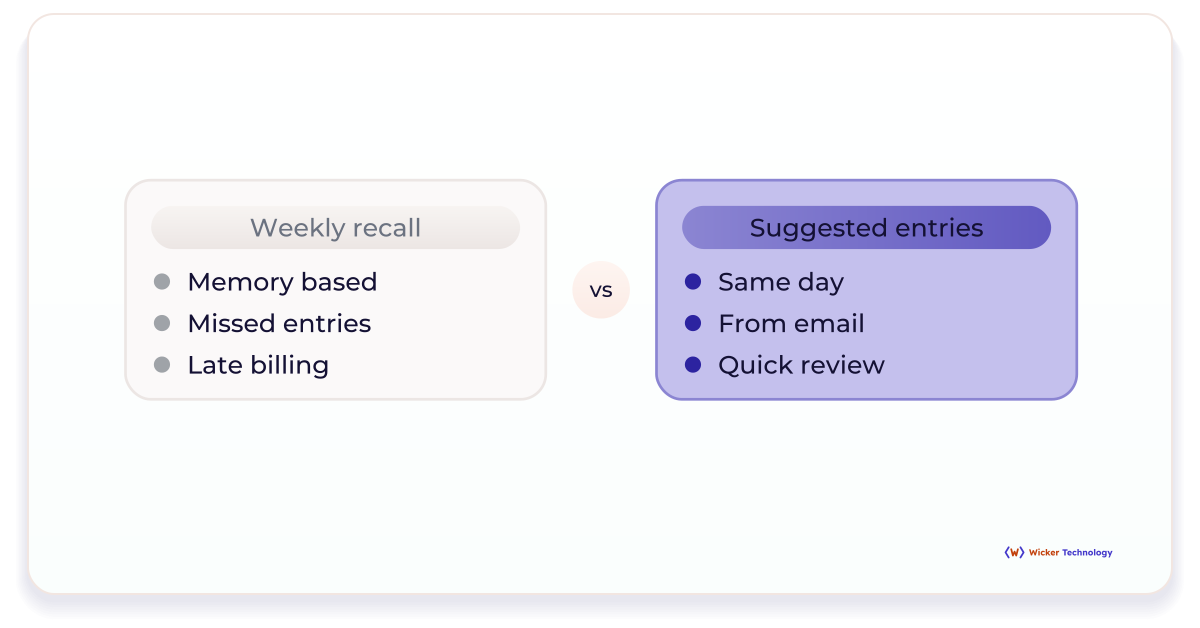
How a rollout usually goes
- Pick a pilot group of five to ten timekeepers across seniority levels.
- Connect email and calendar with the least access the tool needs.
- Show each person their suggested entries at the end of the day for two weeks.
- Track the share of time entered the same day before and after.
- Adjust the matching rules for matter numbers and client codes.
- Extend to the next group after the pilot numbers hold.
What this takes
Several practice management suites bundle automatic time capture, and standalone tools connect to most of them. Your IT adviser should confirm what data the tool stores and where.
Online Payments and Trust-Compliant Billing
Clients pay faster when they can pay by card or bank transfer from the invoice itself. Payment tools built for law firms keep operating and trust funds separate and record each payment against the right matter and ledger, so month-end reconciliation shrinks. Many firms see days sales outstanding fall once payment is one click away.
The risk is compliance. Trust rules differ by jurisdiction, and a payment tool that mixes funds can create problems no amount of speed fixes. Check the tool with your bar's guidance or your advisers, and run a test month in parallel before you switch.
Steps to switch safely
- Document your current payment flow, including who reconciles and when.
- Choose a payment tool built for legal accounts and confirm its trust handling.
- Connect it to the billing system so payments post to the right matter.
- Run a parallel test month and reconcile both sides.
- Add a payment link and clear terms to every invoice template.
- Review failed and disputed payments monthly.
What this takes
Legal-specific payment providers and practice management billing modules cover the main needs. The test month is the most important cost, so plan it into the schedule.
E-Signature and a Client Portal
A client portal gives clients one place to see documents, sign, pay and message the team. E-signature removes the print, sign, scan cycle from engagement letters, retainer agreements and many routine forms. Clients notice first, because they stop chasing the right email in their inbox.
The tactic fails if the portal is optional and nobody mentions it. Make the portal the default path in the engagement letter and send the first documents through it. Keep an alternative for clients who cannot use it, and make sure staff know how to help.
Steps to launch
- Decide which documents go through the portal and which stay on email.
- Set permissions so clients see only their own matters.
- Add the portal invitation to the engagement process.
- Record sent, viewed and signed status on the matter.
- Train staff on the three questions clients ask most.
- Review portal usage after 60 days.
What this takes
Most practice platforms include a portal and e-signature, and standalone e-signature tools work well when you only need that one feature. Check that signed documents return to the matter automatically.
Contract Review and Clause Extraction for In-House Teams
Corporate legal teams spend a surprising share of their time on routine contracts. Tools that read an incoming agreement, extract key terms and flag deviations from your playbook let the team review exceptions instead of every line. Renewal dates and notice periods go into a tracker, so auto-renewals stop arriving as surprises.
I tell in-house clients to treat these tools as a first reader, never as the final one. A lawyer reviews everything the tool flags and spot-checks what it passes. The playbook is the real work: if your team has never written down its fallback positions, the tool has nothing to compare against.
How the review flow works
- Contracts arrive by email or a request form and are stored in a repository.
- The tool extracts parties, dates, renewal terms and key clauses.
- Deviations from the playbook are flagged with the clause and the preferred wording.
- A lawyer reviews the flagged items and the extracted data.
- Approved terms and dates are saved to the contract record.
- Reminders fire ahead of notice periods.
What this takes
Contract lifecycle tools and AI-assisted review add-ons cover this. Start by writing the playbook for your three most common agreement types.
Technology-Assisted Review for Large Document Sets
When a matter involves tens of thousands of documents, reviewers can no longer read everything in reasonable time. Technology-assisted review ranks documents by likely relevance after reviewers code a seed set, so reviewers spend their hours on the documents that matter. The method has years of use in litigation and is accepted by many courts, though you should confirm the position in your forum.
Success depends on process. Document the seed set, the sampling and the validation tests, because you may have to defend the method. Firms that treat the tool as a magic filter without sampling tend to regret it.
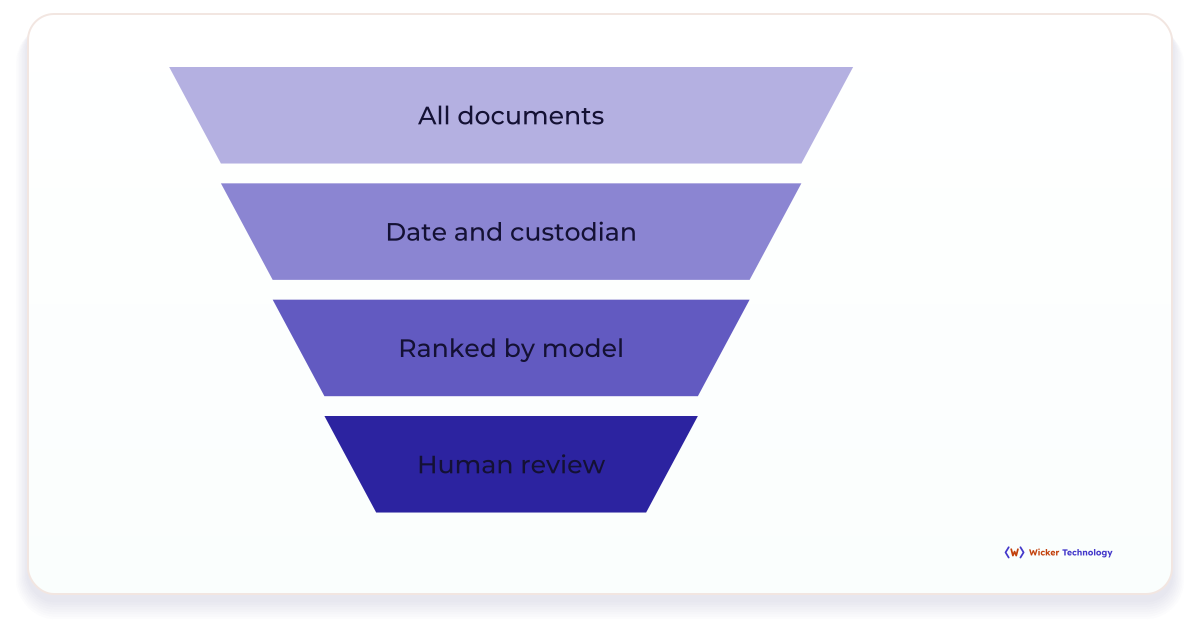
Steps in a typical workflow
- Collect and process the data into a review platform.
- Reviewers code a seed set for relevance.
- The tool ranks the remaining documents and learns from further coding.
- Sampling checks measure what the ranking misses.
- The team decides when the review can stop, with the reasoning recorded.
- Final production is prepared and logged.
What this takes
Review platforms with analytics are the main route, often priced per gigabyte hosted. Ask for a cost estimate on a sample dataset before you commit.
Matter-Based Security and Document Workspaces
A document management system organized by matter gives each file a clear home, version history and access rules. For firms with ethical walls, access by matter is the control that makes the wall real. Search improves because documents carry matter and client data instead of a file name only.
The change feels heavy to lawyers used to shared drives. What wins them over is saving email attachments to the right matter in one click and finding a document without remembering who saved it. Plan the folder structure with the practice groups, not for them.
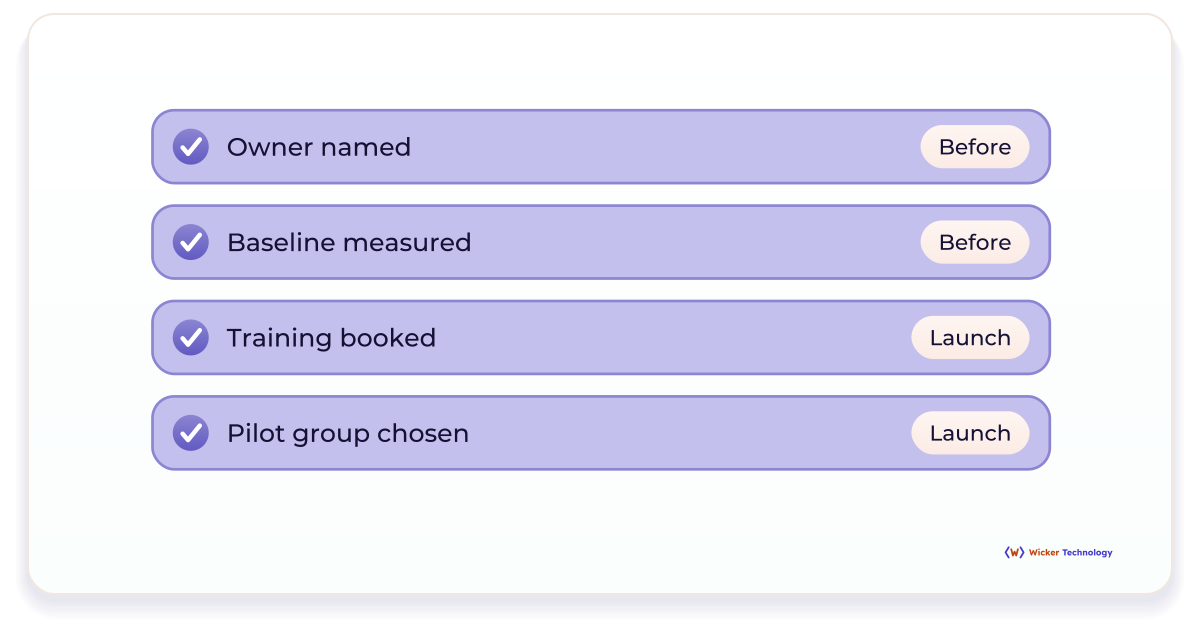
Steps to set it up
- Agree matter numbering and a standard workspace structure per practice area.
- Set default access by matter and add walls where conflicts require them.
- Connect the system to email and your word processor.
- Migrate open matters first and archive the rest.
- Train staff to save to the matter on the first attempt.
- Audit access logs every quarter.
What this takes
Dedicated document management systems and the document features of practice platforms both work. Pick based on your size and how many walls you must maintain.
AI Drafting and Research Assistants With Human Review
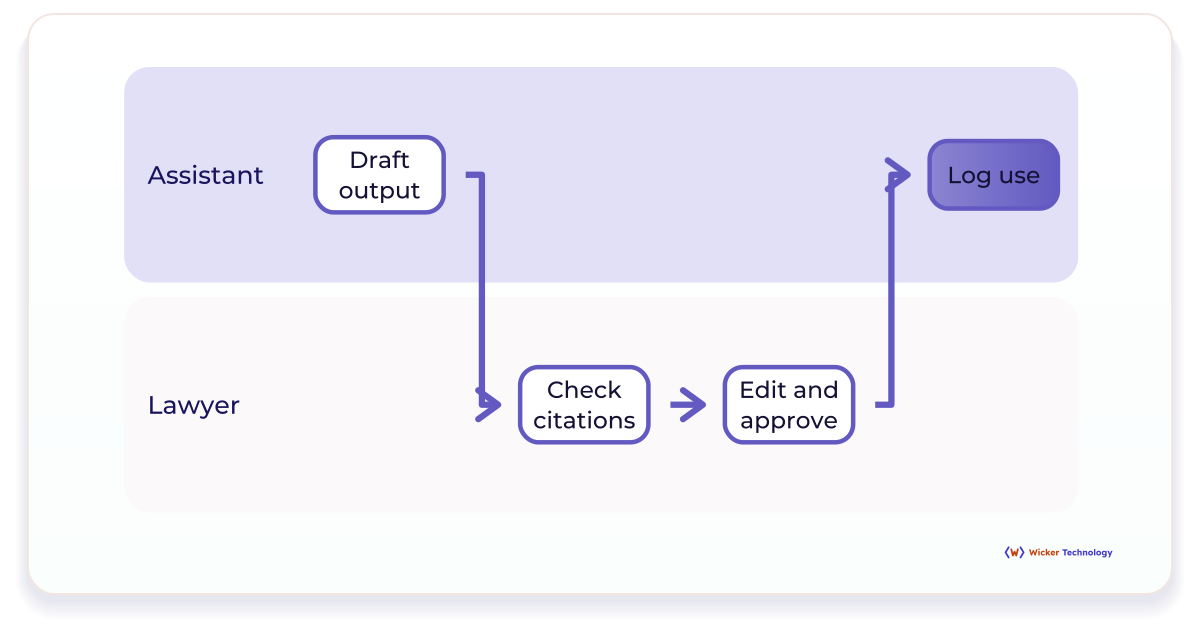
Lawyers now use AI assistants for first drafts, summaries and research starting points. The firms that get value from them set rules first: which tools are approved, which data may be entered, who reviews the output and how the review is recorded. Without rules, lawyers experiment with consumer tools and client data ends up where nobody intended.
Treat every output as unverified work from a junior colleague. Citations must be checked against the source, since assistants can produce references that do not exist. The tactic pays off for summaries, comparisons and outlines, and costs time when used for authority the lawyer has not verified.
Steps to introduce one safely
- Write a short policy covering approved tools, data rules and review duties.
- Choose a tool that offers legal sources, confidentiality terms and audit logs.
- Pilot with a small group on low-risk tasks such as summaries.
- Require citation checks against the original source.
- Record who reviewed what in the matter file.
- Revisit the policy every six months as the tools change.
What this takes
Legal research platforms and document tools now include assistants with confidentiality terms. Ask each vendor in writing how your data is stored and whether it trains their models.
Why Some of These Tactics Stall
When a tactic stalls, the cause is almost never the tool. The usual culprits are no named owner, no baseline number to compare against and training that happens once and is never repeated. Several of the problems I list in legal technology challenges show up here too, in particular partner buy-in and messy source data.
How to Choose Which Tactic to Start With
Score each tactic on three questions: how often does the task happen, how much does a mistake cost and how clean is the data you would feed it? High frequency and clean data point to a good first project. A tactic with messy data and low volume belongs later in the plan.
- Pick one tactic that removes a weekly annoyance for many people.
- Record the baseline number before you change anything.
- Name a lawyer sponsor and a staff champion.
- Check confidentiality, access and ethics rules with your own advisers before you start.
Questions About Legal Technology Examples
What Are the Most Common Examples of Legal Technology?
Practice management systems, document automation, time and billing tools, e-signature, client portals, contract review tools, review platforms for litigation and AI assistants for drafting and research. Most firms start with intake, billing and documents.
Which Legal Technology Gives the Fastest Return?
Time capture and online payments often pay back first, because they affect cash directly. Intake and document automation follow, and larger projects like review analytics depend on matter volume.
Is AI Safe to Use for Legal Work?
It can be, with rules. Use tools with confidentiality terms and audit logs, restrict what data goes in, have a lawyer check every output and verify all citations against the source. Confirm your forum's current rules with your own advisers.
How Do Small Firms Use Legal Technology?
Small firms usually run one practice platform that covers intake, matters, documents, time and billing, and add e-signature and payments. The main goal is to remove double entry and capture time on the day it is worked.
What Does Legal Technology Cost?
Prices range from tens of dollars per user per month for core practice software to custom quotes for document management, contract lifecycle and review platforms. Ask for implementation, migration and renewal terms in writing.
How Do I Measure Whether a Legal Technology Project Worked?
Record a baseline before you start, for example days to invoice, time to open a matter and same-day time entry, then compare the same numbers 90 days after go-live.
Should In-House Legal Teams Use the Same Tools as Law Firms?
Not always. In-house teams care more about contract workflow, requests from the business and renewal tracking, so contract lifecycle tools often matter more than billing. The overlap is in document storage and e-signature.
Important: nothing in this article is legal, financial or tax advice. All figures are estimates from typical projects, so verify them with your own providers and advisers.
Was this useful?
We appreciate the feedback.
Paige Mulvaney
Paige leads the Wicker editorial team and works with the consultants who run the roadmaps, software selections, implementations and integrations to turn real client projects into practical guides. Her focus is plain-language advice on IT strategy, choosing business software and connecting systems so they work together. Every article she edits is checked against current vendor pricing and documentation before it is published.